

Search for "best forex robot" and you will find hundreds of programs promising steady monthly returns while you sleep. A few are honest tools with a real record. Most show a backtest, a screenshot or a smooth equity curve that tells you very little.
This guide explains what a forex robot actually is, how it places trades, the main strategy types and where each one tends to fail. Then it walks through the checks to run before you pay for one, or before you let one near a funded or prop firm account. If you want to compare the platforms you would run a robot on, see our list of forex trading bots.
What a forex robot is
In MetaTrader, the platform most forex brokers offer, a robot is called an expert advisor. MetaQuotes, which makes MetaTrader, describes expert advisors as "mechanical trading systems that allow complete automation of analytical and trading activities".[9]
In practice that means a small program, written in MetaQuotes' MQL4 or MQL5 language, that you attach to a price chart. Once attached, and once the platform's automated trading button is switched on, it can open, change and close trades on your account without you clicking anything.[10]
Three details matter more than they first seem:
- It is software, not a service. The EA sits on your computer or server and trades your account at your broker. The person who sold it does not hold your money.
- You usually can't see the rules. EAs are normally sold as compiled .ex4 or .ex5 files. Those are produced by compiling the .mq4 or .mq5 source code, and you can't read the strategy back out of them.[11] You are trusting the seller's description of what it does.
- It stops when the platform stops. MetaTrader unloads an EA when the terminal shuts down or its chart is closed.[1] If your laptop sleeps, the robot stops managing open trades.
Other platforms have the same idea under other names. cTrader's version is the cBot, a program written in C# or Python that performs "trading operations… on your behalf".[12] Our glossary entry on the expert advisor has the short definition.
How an EA places a trade
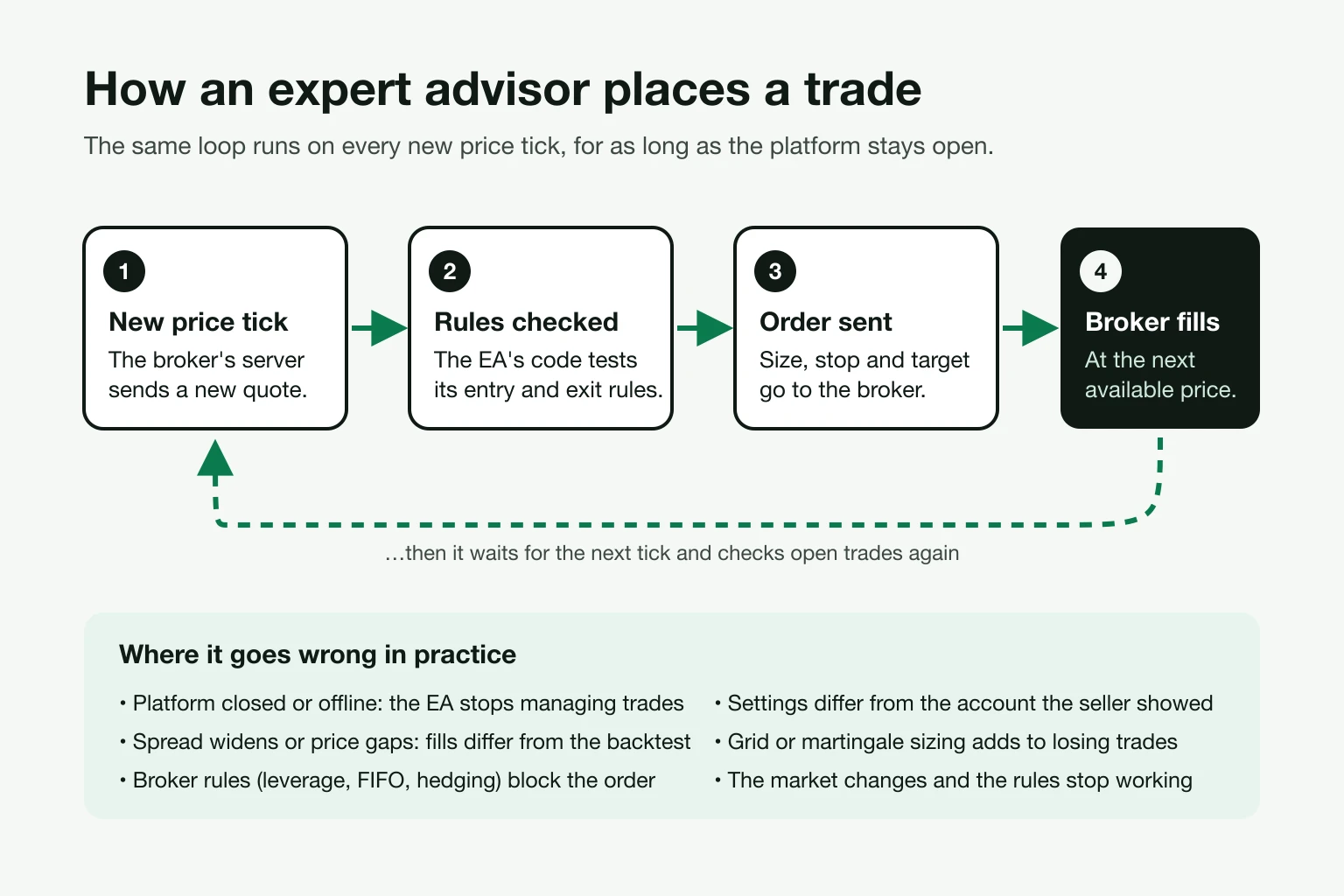
An MQL5 program is built around events. When the EA starts it runs an initialization step, and after that the platform triggers it every time a new price, or tick, arrives for the symbol it is on.[13] On each tick the code checks its rules: is there a signal, is a trade already open, should a stop be moved, should a position be closed?
When the rules say trade, the EA sends an order to your broker with a size, and usually a stop loss and take profit. The broker fills it at the next price it can. That last step is where theory and reality split. In a fast market the price you get can be worse than the price the code saw, which is slippage, and the spread can widen sharply around news.
This is also why an EA that does well for one person can lose for another. Different brokers have different spreads, commissions, execution speed and rules. The same code on a different account is, in effect, a different system.
Keeping it running
Because the EA only trades while the terminal is open, most people who run one seriously use a virtual private server (VPS): a remote computer that stays on around the clock. MetaQuotes says automated trading requires "constant connection to a trade server and uninterrupted power supply", and that choosing a server close to your broker reduces delay.[14] Its built-in VPS costs $15 a month, falling to $10 a month on an annual plan.[15] Our forex bots list compares hosting options.
The main types of forex robot
Sellers rarely say plainly which kind of strategy their EA uses. Knowing the types helps you spot it from the results.
| Type | How it trades | Where it tends to fail |
|---|---|---|
| Trend following | Buys strength and sells weakness, often with moving averages or breakouts. Many small losses, a few large wins. | Long sideways markets. Win rates are often below 50%, which buyers find hard to sit through. |
| Mean reversion / range | Sells near the top of a range and buys near the bottom. | A strong trend that breaks the range. |
| Scalping | Many very short trades aiming for a few pips each. | Costs. A wider spread or extra commission can wipe out the edge. See scalping. |
| News trading | Trades the first seconds after economic releases. | Slippage and spreads at release times; many brokers and prop firms restrict it. |
| Grid | Opens more trades at set intervals as price moves against the first one, then closes the batch on a bounce. | A trend that keeps going. Losses build in open trades until the account runs out of margin. |
| Martingale | Increases size after each loss so one win recovers everything. | A losing streak longer than the account can fund. |
| Latency arbitrage | Exploits delays between a broker's price feed and faster feeds. | Broker and prop firm rules. Brokers such as Pepperstone say latency arbitrage EAs are not allowed.[16] |
| "AI" or machine learning | Any of the above, with rules fitted by a model. | Overfitting: a model tuned to past data finds patterns that don't repeat. |
The label "AI" adds little on its own. The US Commodity Futures Trading Commission warns that the technology "can't predict the future or sudden market changes", and that fraudsters use it to promise "unreasonably high or guaranteed returns".[17] Australia's regulator ASIC said in 2026 that scammers claim their trading bots use AI to generate passive income, and that "it is very unlikely that these trading bots exist."[18]
Why backtests mislead
Almost every robot is sold on a backtest: a replay of the strategy over past prices. Backtests are useful for finding broken ideas. They are poor evidence that an idea works, for three reasons.
The data can be crude. MetaTrader 5's tester has several modes. "Open prices only" uses one price per bar, and in that mode stops and pending orders "may trigger at a price different from the specified one". "1 minute OHLC" uses four prices a minute. "Every tick" simulates every tick, and "Every tick based on real ticks" uses tick history the broker has stored, which MetaQuotes says "provides conditions close to real ones".[2][19] Even in real-tick mode, minutes with no stored ticks are filled with generated ones.[19]
Costs and delays can be left out. The tester can add an execution delay, including a random delay that is 0 to 8 seconds 90% of the time.[2] A backtest run with no delay and the tightest possible spread will look better than live trading ever does.
The settings can be fitted to the past. With enough parameters, any strategy can be tuned to look excellent on the years it was tuned on. MetaTrader's answer is forward testing: it optimizes on the first part of a period and then runs the result on the later part it has not seen.[2] If a seller can't show results on data the settings were not chosen from, the backtest proves little.
The CFTC makes the same point more bluntly. Hypothetical results "typically are based on simulations using historical price data", and "no trading system can guarantee profits". It suggests asking whether the promoter will provide "independent verification of the claimed trading results".[3]
How to check a forex robot before you buy
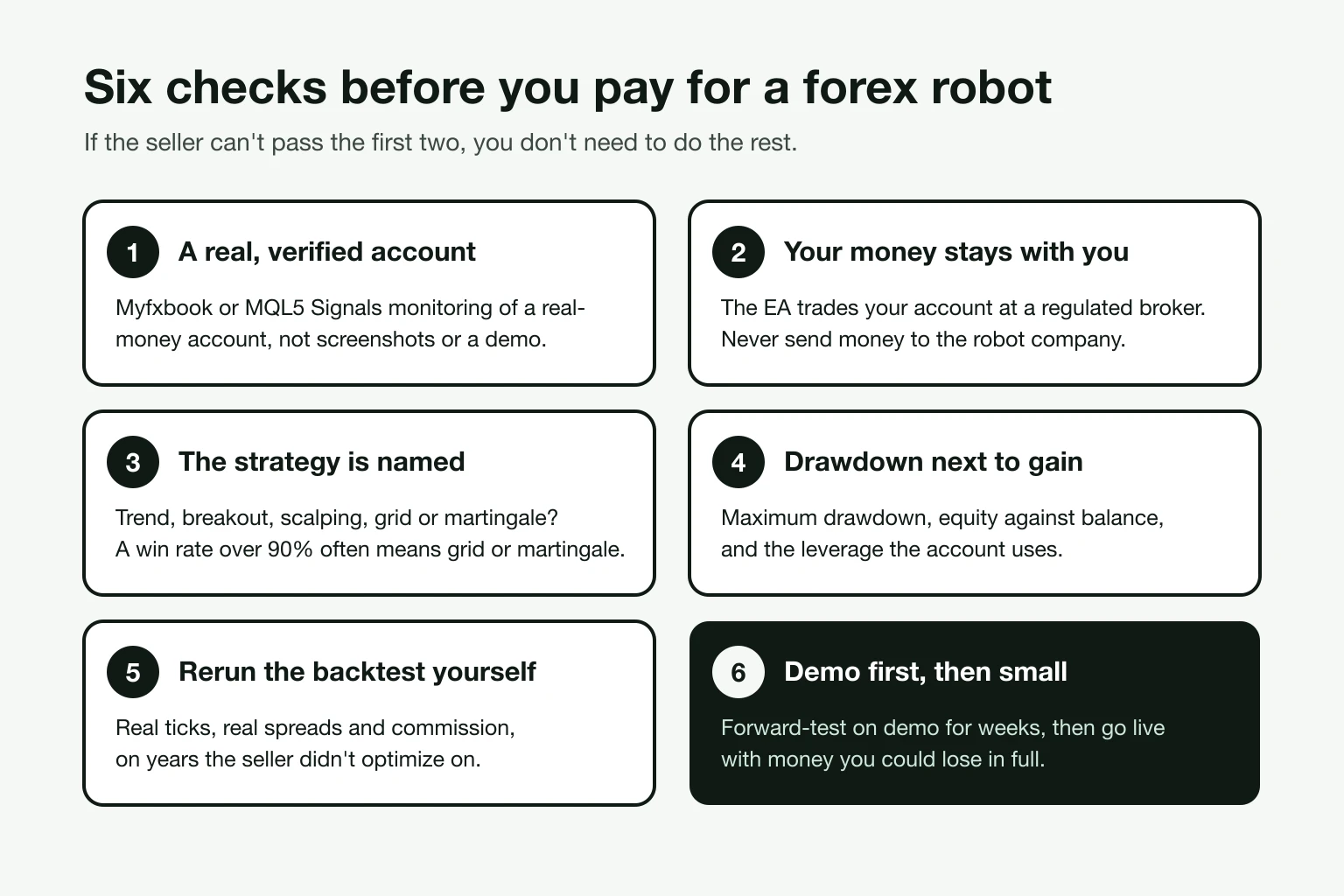
1. Ask for a real account verified by a third party
A real-money account monitored by an independent service is the strongest evidence a seller can give. The two common ones are MQL5 Signals and Myfxbook.
MQL5 Signals only accepts real accounts. Demo, contest and cent accounts are removed.[20] Myfxbook can mark an account's track record and trading privileges as verified. We explain what those badges do and don't prove, and how to read gain against drawdown, in our guide to Myfxbook badges and the glossary entry on Myfxbook.
Screenshots, videos and statements prove nothing. The CFTC says the Mirror Trading International scheme claimed to use a proprietary "bot"; it was ordered to pay more than $1.7 billion in restitution.[5]
2. Make sure your money stays in your own broker account
A genuine EA trades an account in your name at a broker you chose. The seller should never hold your money.
That is the line between a robot and the most common robot scam. In the ROFX case, the CFTC says the operators "falsely claimed to trade forex utilizing a highly successful automated trading robot with guaranteed coverage of losses", and took at least $58 million from more than 1,100 customers.[4] Check the broker too: our guide on how to check if a broker is regulated shows how to confirm it on the regulator's own register. In the UK, the FCA's warning list includes unauthorised firms selling "AI" forex bots.[21]
3. Find out what the strategy is
You don't need the code, but you do need the type. Ask directly: does it use a grid, martingale or any form of averaging down? What is the largest number of trades it can have open? Does it always use a stop loss? Then compare the answer with the record. A win rate above 90% with a large drawdown usually means losing trades are being held open.
4. Read drawdown next to gain
Gain on its own is meaningless. Look at maximum drawdown, the gap between equity and balance, and the leverage on the account. A large gain at 1:500 leverage with a 60% drawdown is not a result you can copy at a regulated broker with lower limits. Our drawdown recovery calculator shows why: a 50% loss needs a 100% gain to recover.
5. Rerun the backtest yourself
If the seller offers a demo, test it in MetaTrader's Strategy Tester on your broker's data. On the MQL5 Market, demo versions run only in the tester, not on a live chart.[22]
- Use "Every tick based on real ticks" and your own broker's symbols.
- Add a realistic delay and include commission.
- Test years the seller doesn't show, and use the forward-test option.
- Compare the result with the seller's live account. Large gaps are a warning.
Our trading cost calculator helps you work out what spreads and commission cost a high-frequency strategy over a year.
6. Demo first, then start small
Run the EA on a demo account for several weeks, with the exact settings you plan to use live. Then go live with an amount you could lose in full, sized with a position size calculator. Watch the first weeks closely: restarts, VPS updates and broker server changes are when EAs misbehave.
What you can't get back
Buying through the MQL5 Market has some protections. Products must not "guarantee, promise or hint at profits", and each purchase includes at least five activations.[22] But purchases "can not be returned", and MetaQuotes takes a 20% commission on sales and on Signals subscriptions.[22][20] It does not guarantee the profitability of any signal.[20]
Robots sold on their own websites have none of those rules. Read the refund terms before you pay, and be wary of any EA sold only as an expensive lifetime licence with no trial.
Robots on prop firm accounts
Using an EA to pass a prop firm challenge is common, and prop firms have written rules about it. They vary a lot:
| Firm | EA rules (as published) |
|---|---|
| FTMO | Trading style is your choice, but it warns that off-the-shelf EAs may mean other traders hold the same trades. It bans EA "hyperactivity" of more than 2,000 server requests a day, exploiting delayed prices and "ultra-high-speed tools".[23][6] |
| FundedNext | Third-party EAs allowed on MT4 and MT5 below $50,000 with a paid add-on. Accounts of $50,000 and above "must trade manually". EAs built to pass challenges are banned.[7] |
| The5ers | Bans third-party EAs "where other traders have the same trades open" and EAs where you don't own the source code, along with HFT and tick scalping.[8] |
| Topstep (futures) | Automated strategies allowed "with conditions", with "no exceptions" for errant trades or malfunctions.[24] |
Most of these firms also ban opposite positions across connected accounts, which rules out many "hedge" setups sold to challenge-takers.[6][8] Read the current rules on the firm's own site before you start, and compare firms on our prop firm rankings. A robot that breaks a daily loss limit in one bad hour ends the challenge however well it did before.
Broker rules that break EAs
Robots built for offshore accounts often fail at regulated brokers. Leverage limits are lower: the FCA caps retail CFD leverage between 30:1 and 2:1 depending on the asset.[25] In the US, NFA Rule 2-43(b) bars dealers from carrying offsetting positions and requires them to close trades first-in, first-out, which breaks hedging and many grid EAs.[26] Brokers may also limit EAs that send too many requests. Pepperstone suggests keeping server messages below 30,000 a day.[16]
Red flags in one list
- Guaranteed returns, "no losing months" or loss cover
- You send money to the robot company or its chosen "account manager"
- Results only as backtests, screenshots or videos
- A verified account that is a demo, or was added years after it started
- High win rate, no stated strategy and a large drawdown
- Pressure to buy now, with only an expensive lifetime licence on offer
- A required broker you can't find on a regulator's register
For platforms you can run an EA on, and the one commercial robot whose real account we could verify, see our forex trading bots list. If you'd rather follow a person than a program, our forex signals rankings compare signal providers on track record.